Best Mechanical Keyboards Under $50 (2026)
A few years ago, a mechanical keyboard under $50 usually meant membrane switches pretending to be mechanical and keycaps that felt hollow. That's changed. In 2026, a $40-50 budget genuinely buys hot-swappable switches, real build quality, and in several cases wireless connectivity that used to be reserved for boards twice the price. We compared layouts, switch types, and build quality across the current budget lineup to find the ones actually worth buying.
Quick Comparison
| Keyboard | Best For | Layout | Connectivity | Price Range |
|---|---|---|---|---|
| Royal Kludge RK61 | Overall value | 60% | Bluetooth / 2.4GHz / USB-C | $ |
| Redragon K552 | Reliability & gaming | TKL (87-key) | Wired | $ |
| Royal Kludge RK68 | Features & arrow keys | 65% | Bluetooth / 2.4GHz / USB-C | $ |
| Keychron C3 Pro | Typing feel | TKL (87-key) | Wired | $ |
| NEWMEN GM325 Pro | Full-size layout | Full-size (104-key) | Wired | $ |
How to Choose a Mechanical Keyboard Under $50
Budget mechanical keyboards vary a lot more than their price tags suggest. Here's what actually separates a good sub-$50 board from a disappointing one:
1. Hot-Swap Sockets
A hot-swappable board lets you pull out and replace individual switches without soldering. This means you can try different switch feels, or fix a failed switch, without any special tools or skills.
2. Switch Type
Most budget boards ship with Outemu switches — affordable, reliable clones of Cherry MX designs. Some higher-tier budget picks step up to Gateron switches, which are generally smoother and more consistent.
3. Layout Size
60% and 65% layouts save desk space and look clean, but drop function keys or a number pad. Full-size (104-key) boards keep every key at the cost of a bigger footprint — pick based on your desk space and whether you actually use a numpad.
Top Mechanical Keyboards Under $50
Royal Kludge RK61
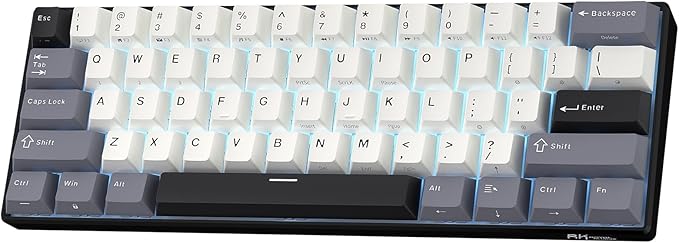
The RK61 has become the benchmark for budget mechanical keyboards for a reason: tri-mode wireless (Bluetooth, 2.4GHz, and wired USB-C), hot-swap sockets, and a compact 60% layout that's genuinely portable, all in the $40-50 range. It outperforms several $70-80 boards on features alone — at this tier, spending more tends to buy better build quality and typing feel rather than new functionality.
- Layout: 60% (61-key)
- Connectivity: Bluetooth 5.0 / 2.4GHz / USB-C wired
- Switches: Hot-swappable, multiple options available
- Best for: Multi-device switching, portable setups
PROS
- Tri-mode wireless at this price is rare
- Hot-swap sockets for easy switch changes
- Compact enough for small desks or travel
CONS
- No dedicated arrow keys (60% layout)
- Stock keycaps are basic ABS plastic
Redragon K552

The K552 has stayed a go-to budget pick for years, and it earns that reputation with a proven track record rather than flashy specs. Its compact TKL (tenkeyless) layout keeps a numpad off the desk while retaining full function-row and navigation keys, backed by a solid metal-plated frame that feels sturdier than its price suggests.
- Layout: TKL (87-key)
- Connectivity: Wired USB
- Switches: Outemu mechanical switches
- Best for: Gaming, everyday reliability
PROS
- Durable metal-plated frame
- Long track record of reliability
- Compact TKL layout with function keys intact
CONS
- Wired only, no wireless option
- Not hot-swappable
Royal Kludge RK68

The RK68 sits just above the RK61 in Royal Kludge's lineup, adding dedicated arrow keys that many 60% boards skip entirely. It keeps the same tri-mode wireless setup and hot-swap sockets, making it a strong pick for anyone who wants a compact board but relies on arrow keys for navigation, spreadsheets, or editing work.
- Layout: 65% (68-key)
- Connectivity: Bluetooth / 2.4GHz / USB-C wired
- Switches: Hot-swappable
- Best for: Compact desks that still need arrow keys
PROS
- Dedicated arrow keys, unlike most 60% boards
- Same reliable tri-mode wireless as the RK61
- Hot-swappable switches
CONS
- Slightly larger footprint than the RK61
- Still no dedicated function row
Keychron C3 Pro

Keychron built its name on higher-end boards, and the C3 Pro brings some of that typing quality down to sub-$50 territory. It uses Gateron switches, generally considered smoother and more consistent than the Outemu switches found in most competitors at this price, making it the pick for anyone prioritizing feel over features.
- Layout: TKL (87-key)
- Connectivity: Wired USB-C
- Switches: Gateron mechanical, hot-swappable
- Best for: Typing feel, first mechanical keyboard upgrade
PROS
- Gateron switches feel noticeably smoother
- Hot-swappable despite the low price
- Keychron's build quality reputation carries over
CONS
- Wired only
- No numpad (TKL layout)
NEWMEN GM325 Pro

If you rely on a numpad for data entry or spreadsheet work, most budget mechanical keyboards will disappoint you — compact layouts dominate this price range. The GM325 Pro is the exception, offering a full 104-key layout with a rugged metal top plate that gives it a sturdier feel than its price suggests.
- Layout: Full-size (104-key)
- Connectivity: Wired USB
- Switches: Mechanical, metal top plate construction
- Best for: Numpad users, data entry, spreadsheet work
PROS
- Full 104-key layout with numpad
- Metal top plate feels sturdier than most budget boards
- Good value for a full-size mechanical board
CONS
- Larger desk footprint
- Wired only, no wireless option
Frequently Asked Questions
Can you get a real mechanical keyboard for under $50?
Yes. As of 2026, $40-50 buys a genuinely mechanical keyboard with real switches, hot-swap sockets on many models, and solid build quality. This wasn't true a few years ago, when budget boards often used membrane switches disguised as mechanical.
What is hot-swappable on a mechanical keyboard?
A hot-swappable keyboard lets you remove and replace individual switches without soldering, using sockets built into the circuit board. This means you can try different switch types or replace a failed switch without any special tools.
Are budget mechanical keyboard switches (Outemu, Gateron) good enough?
For most users, yes. Outemu switches are affordable clones of Cherry MX designs and handle everyday typing and gaming well. Gateron switches, found in slightly higher-tier budget boards, are generally considered a step up in smoothness and consistency.
Should I buy a wireless or wired budget mechanical keyboard?
If you want a cleaner desk setup or plan to switch between a computer and tablet, tri-mode wireless boards (Bluetooth, 2.4GHz, and USB-C) are now available under $50 and are worth the small premium. For competitive gaming, a wired connection still offers marginally lower input latency.